A first order is a good start. The next question is how to give that customer a reason to shop with you again.
Once you know what you want to improve, the setup becomes much easier. Choose a reward that makes sense for your store, set clear rules, and make sure customers can find and use their rewards without any confusion.
Why Build a Loyalty Program for Your Shopify Store?
Someone who has bought from you already knows what the product is like, how the delivery went, and whether the store felt reliable. A reward gives that buyer a reason to check your store before placing the next order somewhere else.
A Shopify loyalty program could add credit after a purchase, give points for a review, or reward a successful referral. You choose which orders count and how the reward can be used later. This is different from running a store-wide discount that lowers the price for every shopper.
How to Build a Loyalty Program on Shopify in 8 Steps
The first version can be fairly small. One way to earn and one way to use the reward are enough for a proper test. If customers complete both steps without asking for help, you can add another option later.
Step 1: Choose One Goal
Open your Shopify reports and look at what customers do after their first order. Check how many return, how long they wait, and whether the second order is larger or smaller.
Choose one result to improve:
- Repeat purchase rate
- Average order value
- Time between orders
- Customer referrals
If skincare customers usually need a refill after six or eight weeks, you could track how many place another order within 60 days. A furniture store will see a different pattern because buyers do not replace a sofa every few months. Referrals may be more useful for that type of store.
Step 2: Choose a Reward Customers Will Understand
The reward needs to fit the way the product is bought. A coffee subscription and a dining table should not use the same loyalty setup. Loyalty points are useful when you want to reward more than purchases. A shopper could earn them for writing a review, referring a friend, or placing another order. Store credit removes the conversion step because the customer can see the amount available to spend.
VIP tiers make more sense once you have enough regular customers to separate them by spending or activity. Avoid copying another brand’s setup without checking your own margins and buying cycle.
Step 3: Keep the First Earning Rule Simple
For the first launch, choose the action closest to the sale. A purchase reward is easier to check than a program with six different ways to earn.
For example:

A shopper can read that on the product or cart page and know what will happen after checkout. You can add other ways to reward customers on Shopify once the first offer is earning redemptions without creating support questions.
During setup, we use one practical check: if an offer needs a long paragraph to explain it, the rule still needs work.
Step 4: Set Clear Redemption Rules
Now decide how those rewards can be used.
Think through:
- Minimum order value
- Maximum reward used per order
- Expiry
- Discount stacking
- When the reward becomes available
- Refunds and canceled orders
For example, you could let shoppers use up to 20% of an order from their Shopify store credit balance.
The exact numbers will depend on your margins. The important part is to set the rules before customers start earning rewards.
Step 5: Make Rewards Easy to See and Use
A reward that sits somewhere in the background is easy to forget. Show the balance where customers are already looking: their account, loyalty widget, cart, checkout, or useful email updates.
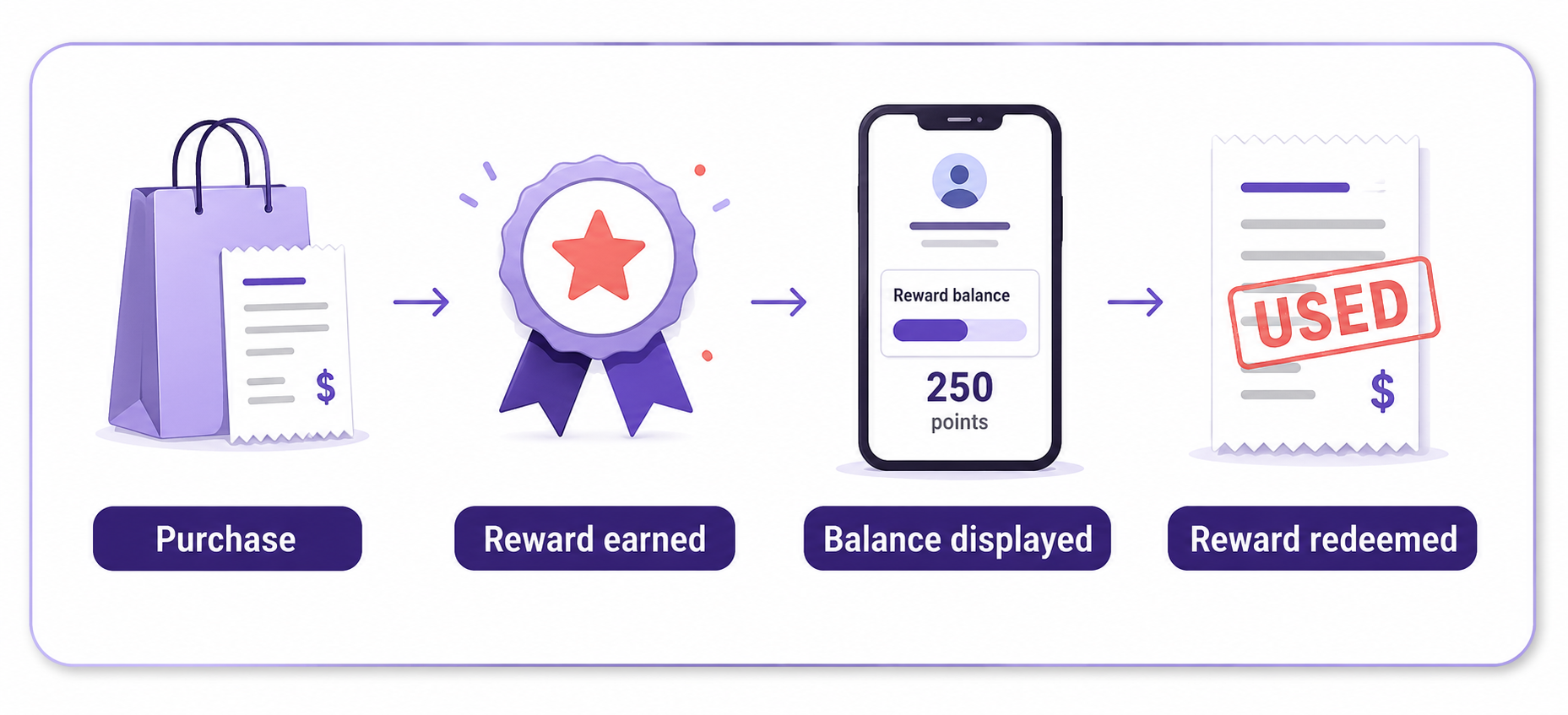
A simple way to think about the experience is:
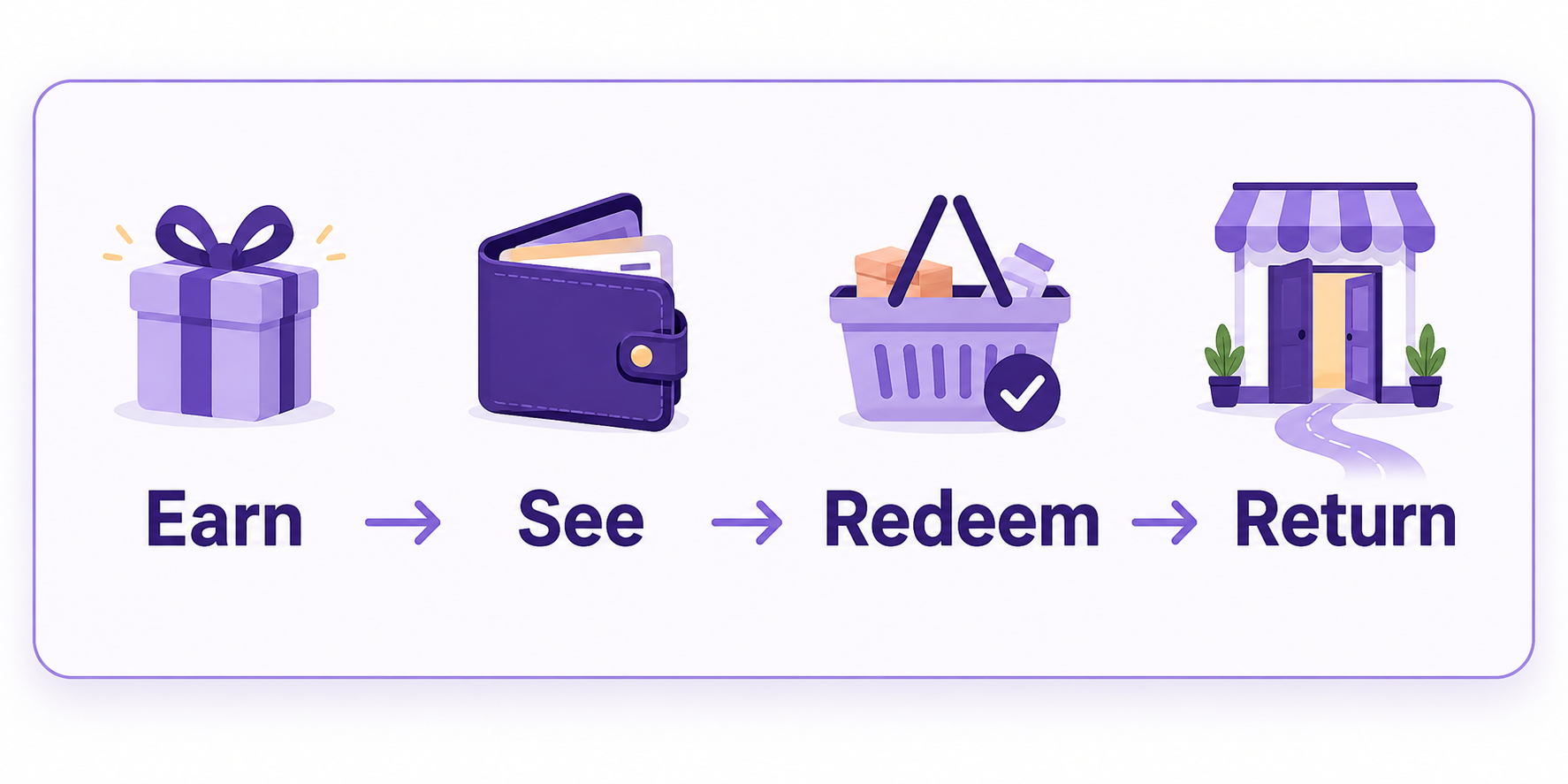
The customer earns something, sees it clearly, uses it without confusion, and has a reason to come back.
Baymard's 2025 research on loyalty-program UX also points to the importance of clear information around earning, balances, and redemption. Its research covered more than 1,900 hours of loyalty UX work and 350+ participant/site sessions.
Step 6: Automate Your Loyalty Program
Manual reward management gets old quickly.
A good Shopify loyalty app should handle the routine parts for you, such as:
- Reward calculations
- Balance updates
- Redemptions
- Reward notifications
- Referral rewards
Referral rewards
Step 7: Set Up and Test Your Loyalty Program in Shopify
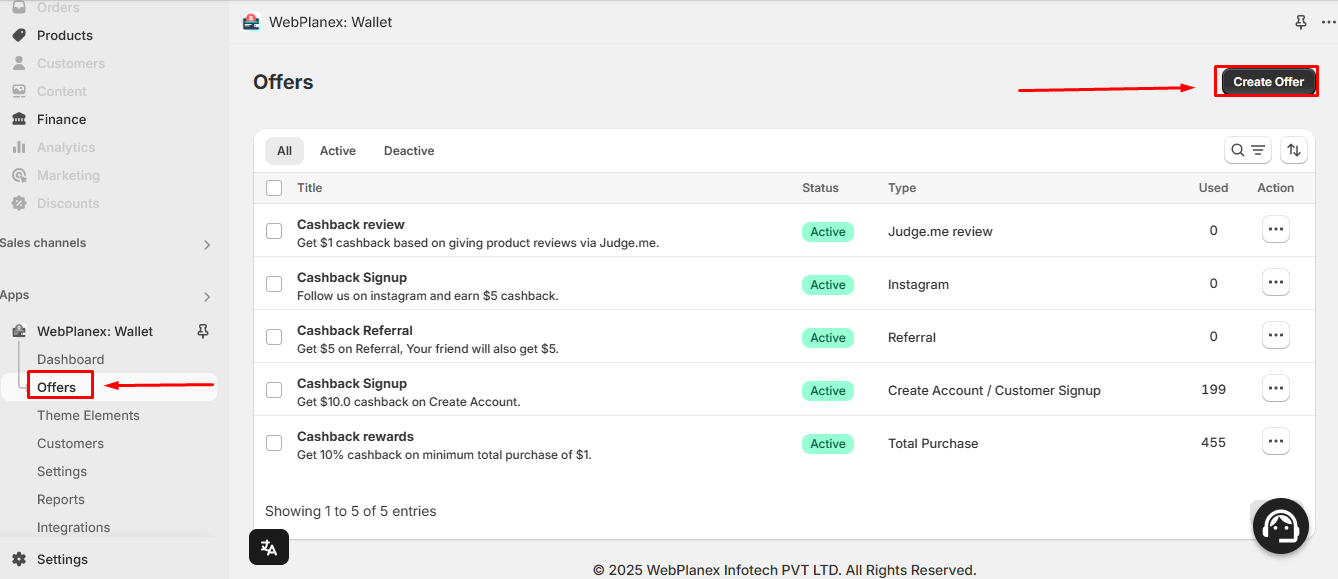
Once your rules are ready, you can set up the offers in Loyalty Wallet.
Create a Reward Offer
Create the offer and define what customers can earn.
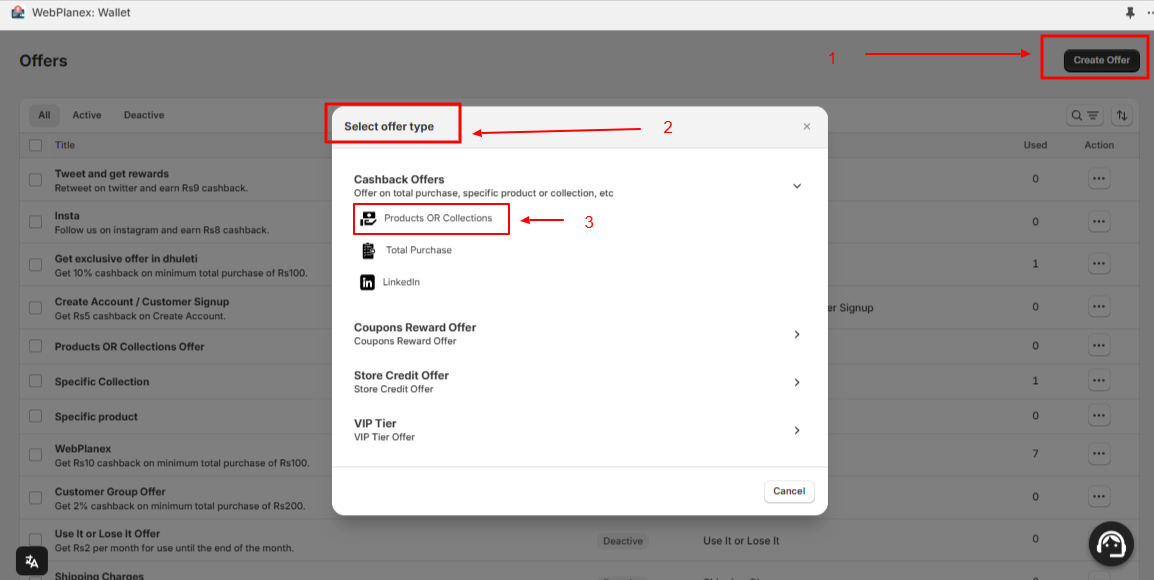
Add the Reward Details
Enter the earning conditions and other offer settings. Keep the customer-facing rule as clear as possible.
Save and Activate
Check the settings, save the offer, and activate it when you're ready.
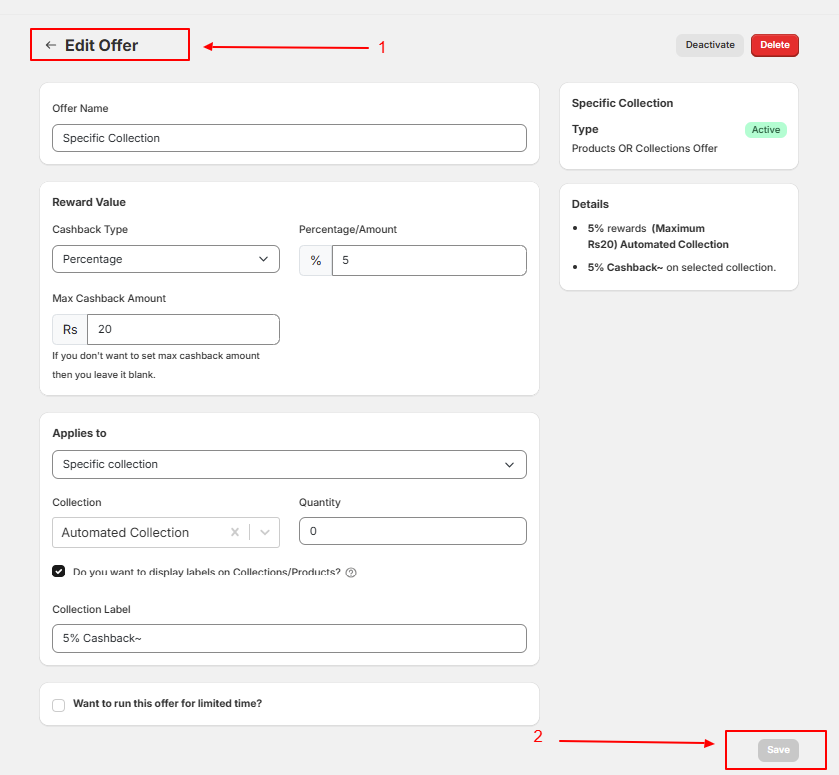
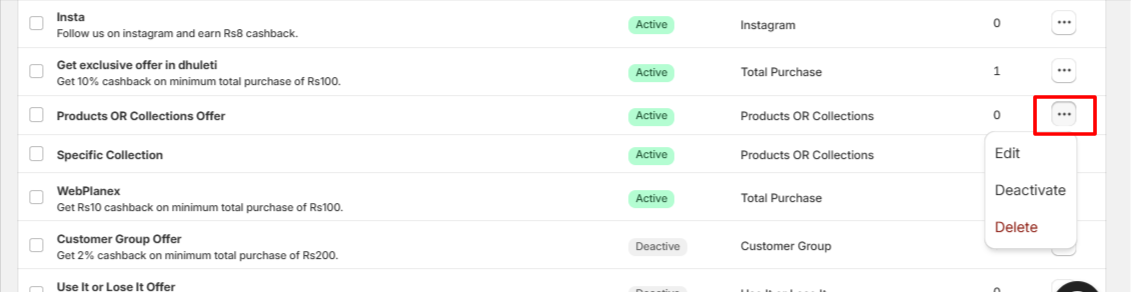
Manage Live Offers
Once an offer is active, you can review it and make changes as your store's needs change.
If you're learning how to set up a loyalty program on Shopify, test the full customer journey before launch:
Also test refunds and cancellations. Finding a problem yourself is much easier than finding it through a customer support message.
Step 8: Measure and Improve Your Loyalty Program
Don't stop at member count.
Look at:
- Repeat purchase rate
- Time to second order
- Reward redemption rate
- Average order value
- Active loyalty members
The real question is whether members are coming back and buying.
That gives you a more useful view of loyalty program ROI than simply knowing how many people signed up.
Give the program some time before making major changes. If the numbers are weak, start with one thing. Adjust the reward, redemption limit, or earning rule and see what happens.
Common Shopify Loyalty Program Mistakes
Keep an eye out for the usual trouble spots: complicated rules, rewards that don't feel worthwhile, excessive discounting, poor reward visibility, and manual work. Also, don't confuse enrollment with engagement. A large member list means little if people never earn or redeem anything.
If you're considering points, read Why Points-Based Shopify Loyalty Programs Don't Work. If customers join and then disappear, see Why Customers Leave Loyalty Programs: 10 Reasons.
Conclusion
A good loyalty program doesn't need the most points, tiers, or features. It needs to make sense to the person using it.
If you're ready to build a loyalty program on Shopify, start small. Give customers a reward they understand, make their balance easy to find, and automate the work behind it. Loyalty Wallet helps Shopify merchants create reward offers, manage customer balances, and give shoppers a clear path from earning a reward to using it on their next order.