Discount codes are easy to run, but the savings end with that order. Cashback leaves the buyer with value for a later purchase. You can add a cashback app to Shopify without building a wallet or tracking rewards by hand. Loyalty Wallet keeps the balance and transaction history, while you choose which orders earn a reward and when it can be spent.
What Does Cashback Mean for Your Customers?
If a product page promises “Get $5 back,” the customer will expect to find that $5 after checkout. It could appear as wallet credit, Shopify store credit, points, or a coupon. These rewards sound similar, but customers use them differently.
| Reward type |
How it works |
Best suited for |
| Cashback |
Gives value that can be used later |
Encouraging another order |
| Store credit |
Adds credit to a customer account |
Rewards, refunds, and retention |
| Loyalty points |
Turns purchases or actions into points |
Flexible loyalty programs |
| Discount |
Lowers the current order price |
Short-term promotions |
Some apps keep rewards in their own wallet. A Shopify store credit app may add them to Shopify’s native balance instead. Customers need customer accounts or Shop Pay to spend native credit, since legacy accounts do not support it. Read Shopify’s store credit guide before choosing this option.
Check Your Store Before Creating the Offer
A rate that works for another brand may not suit yours. Plan your Shopify cashback program around margins, average order value, and purchase frequency.
Before switching on an offer, check the following:
- Customers have a realistic reason to purchase again.
- The reward amount leaves enough margin on the order.
- Credit is added at the right order stage.
- Returns and cancellations remove rewards correctly.
- Customers can easily find and use their balance.
Cashback usually suits products that customers buy regularly.
Set Up Cashback on Shopify in Seven Steps
Once the reward and conditions are clear, work through the setup in order and place test orders before launch.
1. Install Loyalty Wallet
Open the Shopify cashback app page and check its permissions, pricing, features, and order limits. Select Install, choose the store, and approve access. A free plan is available for smaller order volumes.
2. Build Your First Cashback Offer
For cashback rewards for Shopify, choose a percentage or fixed amount. Apply it to selected products, collections, order values, or customer groups. A 5% reward on a qualifying $100 order gives $5 in wallet credit, but your margins should determine the final rate.
3. Decide When the Reward Is Added
Credit added too early may remain in the wallet after a failed payment. Choose payment, fulfillment, or delivery as the trigger, then test full and partial refunds.
4. Set the Redemption Rules
Set any minimum order value, how much balance can be used, and whether it combines with discounts. If the reward expires, show the date clearly.
5. Place the Wallet Where Customers Can Find It
Add the Shopify customer wallet to the account area or menu. Show the expected reward on product or cart pages, then display the amount earned on the thank-you page.
6. Send Useful Reward Messages
Tell customers when credit is ready and remind them before it expires. Deloitte found that 40% of surveyed consumers sometimes forget to redeem rewards. A clear balance message can help without becoming another sales email.
7. Test the Whole Journey
Use a test customer and follow the same path a real buyer will take:
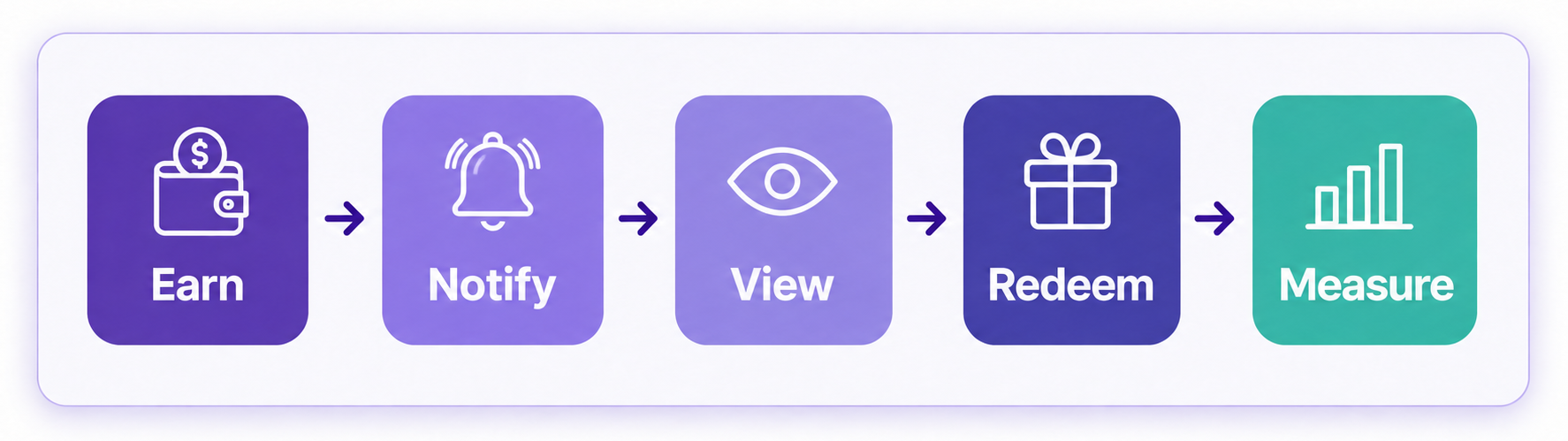
Place an order, check the wallet, and use the balance on another order. Then refund the original purchase and check the balance again. Fix any confusing step before launch.
Keep Cashback Costs Under Control
Cashback costs the business when it is redeemed. Low-margin or discounted products may need to be excluded, while too many conditions can confuse customers. Compare redeemed and issued credit. A large unused balance may mean shoppers cannot find the wallet or have no reason to return soon.
Check Whether the Program Is Working
Track redemption rate, repeat purchase rate, average order value, time between orders, and net reward cost. Compare members with similar non-members. Sales and email campaigns also bring shoppers back, so cashback should not receive credit for every repeat order.
Why Use Webplanex: Loyalty Wallet?
Webplanex: Loyalty Wallet is a Shopify loyalty app with the Built for Shopify badge. It manages cashback, points, store credit, referrals, VIP programs, wallets, notifications, POS rewards, and reports. A free plan and trial are available, while features vary by plan. Check the Shopify App Store for current details.
Frequently Asked Questions
Does Shopify Have a Built-in Cashback Program?
Shopify includes native store credit, but not a complete automated cashback program. A loyalty app adds earning rules, wallets, messages, referrals, and reports.
Can I Add Cashback to Shopify Without Coding?
You can configure a cashback app without developing the system yourself. Some themes may need an app block or help with wallet placement.
Is Cashback the Same as Shopify Store Credit?
Cashback is the offer, while store credit is one way to deliver it. A store may also use wallet balance, points, or coupons.
Conclusion
An earning rule is only part of the setup. Customers must see the balance, understand the conditions, and use it without help. When you add a cashback app to Shopify, choose rules your margins can support and test every step before launch.
Install Webplanex: Loyalty Wallet and create your first reward offer.